PERSONAL PRODUCT · BUILT WITH LOVABLE
Sticker Buddy
The tracker I wanted for my own album.
Opening packs should be the fun part. Keeping track of hundreds of stickers, remembering which ones are missing, and sorting duplicates for a trade can turn collecting into paperwork. I built Sticker Buddy to take care of that part, and I used it to fill my own World Cup 2026 album.
Tech stack
 Lovable
 React
React Tailwind CSS
 Supabase
 PostgreSQL
INSIDE THE APP
What do I have? What do I need? What can I trade?
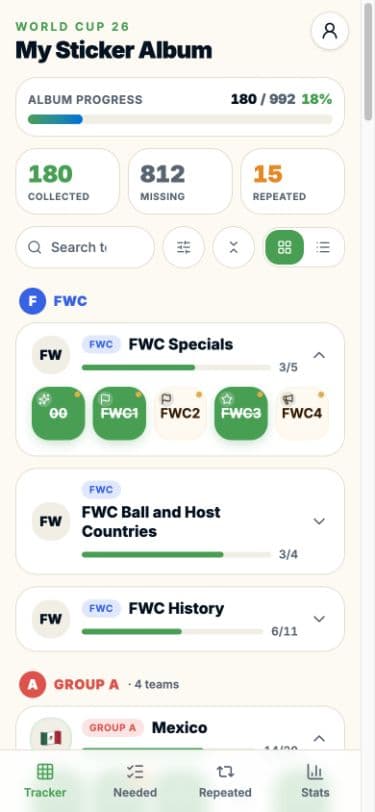
One collection feeds the album tracker, the missing-sticker list, the duplicate inventory, and the progress statistics. The catalog has 980 base-album stickers plus 12 Coca-Cola extras across 52 sections.
Try Sticker Buddy (opens in a new tab)Who used it
28 collectors using it
I started with friends and family who were filling the album too. Then I shared it with my volunteer team at the World Cup, and after that with a WhatsApp group of collectors.
Every complex feature I added, such as parallel tracking, trade comparison, and the album importer, started as a piece of feedback from someone using the app.
Why I built another sticker tracker
There were already options. I tried Panini’s free tracker and did not find it easy to use. Figuritas made tracking straightforward, but I would have had to pay a subscription to remove the ads or put up with them, and neither worked for me. The ads got in the way while I was collecting.
So I decided to build the tracker I wanted to use and make it free. I used Lovable, an AI app builder, to turn that idea into Sticker Buddy. I started from the questions every collector asks: which stickers do I have, which are missing, and which duplicates can I trade?
From opening a pack to updating the album
I designed the main interaction around a quick tap. Tap a missing sticker to add it to the collection; tap it again to add a duplicate. The totals and team progress update together, so there is no separate trading spreadsheet to maintain. A double-tap removes a copy, with an undo action for mistakes.
The Needed view shows only the remaining gaps, and adding a sticker there removes it from the list. The Repeated view shows spare quantities, which collectors reduce as copies leave their trading pile. Grid and list views give a choice between a compact checklist and rows with player details. Search and sorting, by album order or alphabetically, help find the right entry.
Tracking the physical collection, including rare copies
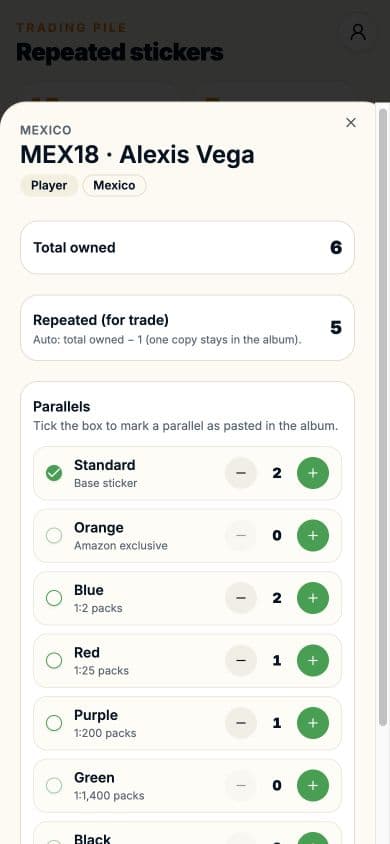
Parallel variants made the app more complicated than the number-based tracking I found in other apps. One sticker number can come in several colored versions, each with a different rarity. Knowing the number is not enough when a collector needs to know which colors they own and which copies they can trade.
Some collectors build their collection around specific rare parallels. They may trade one rare copy for several less-rare copies, so a plain duplicate count leaves out information that matters in the conversation. Others do not use parallels or care about color. They just want every number in the album. I wanted both kinds of collectors to be able to use the same app.
The default tracker is a simple number-based checklist. For collectors who want more detail, a long-press opens quantities by color and shows which copy is pasted into the book. Color filters help find a specific parallel without searching the whole collection. The app tracks the inventory for a trade, and collectors decide the exchange and its value.
Owning a sticker and pasting it into the album are different states. Only one variant of a sticker can be marked as pasted, and removing a copy takes the unpasted, more common ones first. That keeps the copy in the album separate from the extras in the trading pile.
Making a trade easier to compare
A list of duplicates is only half of a trade. What matters is whether another collector needs those stickers and has something I need in return. I built a QR-code and shareable-link workflow so account holders can compare their collections.
The matching logic checks each person’s spare copies against the other person’s missing stickers and splits the results into what each side can give. It also accounts for parallel variants. A camera scanner works for in-person trades, and a shareable link is another way to open the comparison.
Importing an existing album
Someone with a partially filled album should not have to start by tapping hundreds of entries. I added a text importer that reads sticker numbers grouped by team or section, including quantity and parallel information. It previews the proposed changes before merging them into the collection.
For a paper checklist or spreadsheet, the app gives a copyable prompt that an external AI assistant can use to convert it into the importer’s text format. The collector reviews the result before applying it, so nobody starts from an empty album.
Quick local updates, with optional account backup
You can start without an account, and the inventory saves in the browser. An account adds cloud storage and a sign-in merge that takes the higher of the local and stored quantities for each entry, so a merge never reduces existing counts. Changes are batched briefly before going to the backend to handle rapid pack-opening taps.
I built the app with React, TanStack routing, Tailwind CSS, and a PostgreSQL backend through Lovable Cloud and Supabase. Each tab keeps its search and scroll position when collectors switch views.
Progress and stats
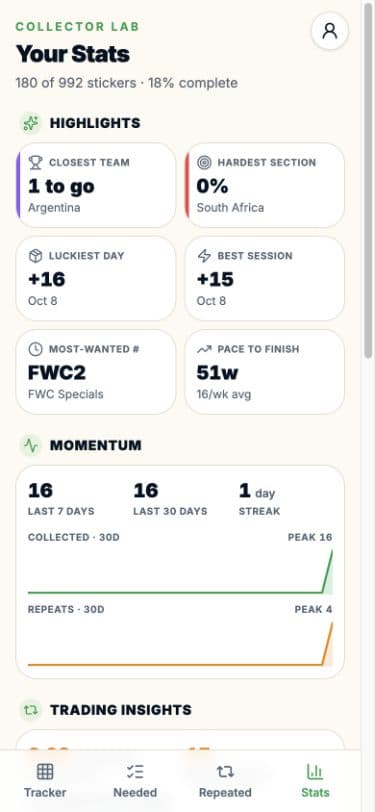
The Stats view shows the teams closest to completion, remaining gaps, duplicate inventory, and recent collecting activity. Session tracking and 30-day charts show how the album is growing, next to the current totals.
Inventory and activity history are kept separate on purpose. Imported or synced counts do not invent past collecting dates, so time-based insights start from activity recorded on that device. The album’s completion totals come from the inventory.
From my album to other collectors
Sticker Buddy began as my own frustration as a collector. I used it to fill my own album, so I built it around what I actually do: open packs, update the collection, find gaps, and prepare trades. Lovable let me turn that problem into an app I could use and offer for free.
Their feedback pushed the app beyond my own collecting habits. I plan to keep improving it for the next World Cup.